
-
Countdown: Amazon Will Rewrite Your Titles If You Don’t
By ZonSupport | Posted on June 28, 2026| Blog
Starting July 27, 2026, Amazon will cap product titles at 75 characters across all categories except media
Exceed this limit, and Amazon’s AI will automatically rewrite your title on its own schedule
Alongside this cap comes a new field: Item Highlights, which provides 125 searchable characters directly below the title
It is already live on mobile devices in search results and on product detail pages
This shift replaces a loosely enforced 200-character limit that stood for nearly a decade
Instead of treating Item Highlights as a mere dumping ground for leftover keywords, sellers must strategically use it to retain control over their search visibility
If you leave it blank, Amazon’s AI will dictate both your title cuts and the contents of this new field, potentially damaging your organic ranking
This blog is a summary of a deep dive into this by ZonGuru. It’s the best DIY guide we have read to date on this topic. A link to their full blog is provided at the end.
Key Takeaways
From July 27, 2026, non-media product titles are capped at 75 characters, supplemented by a new 125-character searchable Item Highlights field
Item Highlights is an indexed, consumer-facing field, not bullet-point overflow
Format the field as comma-separated labeled attribute phrases (materials, use cases, size) rather than full sentences or keyword stuffing
Keep your highest-converting, rank-carrying keywords in the 75-character title to protect your listing’s organic positioning
Brand Registered sellers receive a 14-day window to review and adjust Amazon’s automated AI rewrites before they go live; non-registered sellers do not
What is the Amazon Highlights field?
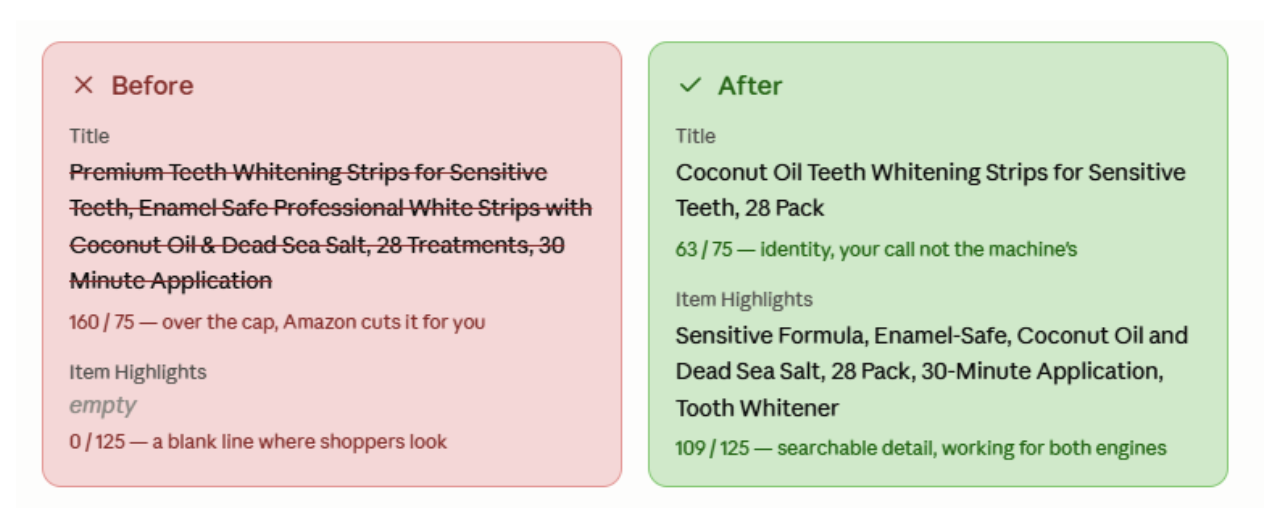
Consider a typical teeth-whitening listing with a bloated 162-character title and an empty Item Highlights field
The Item Highlights field provides 125 searchable characters to catch the displaced high-value information
Sellers refer to this update as the 75/125 rule
More importantly, a blank field yields all optimization control to Amazon’s automated systems, which optimize for length rather than keyword conversion
Item highlights vs bullet points, your title, and back end keywords
Item Highlights is not simply a shortened version of product bullet points
Title (75 chars): Identifies the brand, core product, and primary differentiator
Item Highlights (125 chars): Provides scannable, labeled attribute phrases shown directly in search results
Bullet Points: Delivers detailed feature-and-benefit copywriting further down the page
Product Description / A+ Content: Houses narrative copy, long-tail terms, and objection-handling
Backend Search Terms: Indexes hidden keywords away from consumer view
What to put in your 125 characters
Here’s what the whitening listing carried after a rebuild:

An optimized Item Highlights string for the teeth-whitening example looks like this
Sensitive Formula, Enamel-Safe, Coconut Oil and Dead Sea Salt, 28 Pack, 30-Minute Application, Tooth Whitener
This 109-character string succeeds because it addresses the core questions Amazon’s AI uses to evaluate products
Who it’s for: Sensitive Formula
What it’s made of: Coconut Oil and Dead Sea Salt
What it is: 28 Pack
How it’s used: 30-Minute Application
What it does: Enamel-Safe
When managing your characters, apply a Keep / Move / Avoid strategy
Keep your primary brand identity and top converting terms in the title
Move verified secondary keywords, sizes, and materials into Item Highlights
Avoid repeating words from the title, promotional jargon, or unverified claims
Write it as labeled attributes, not a sentence or a keyword dump
Formatting determines how effectively your text is parsed
The ideal format relies on comma-separated phrases
This perfectly mirrors Amazon’s official field guidance, which favors benefit-driven phrases, bans keyword stuffing, and prohibits repeating title content
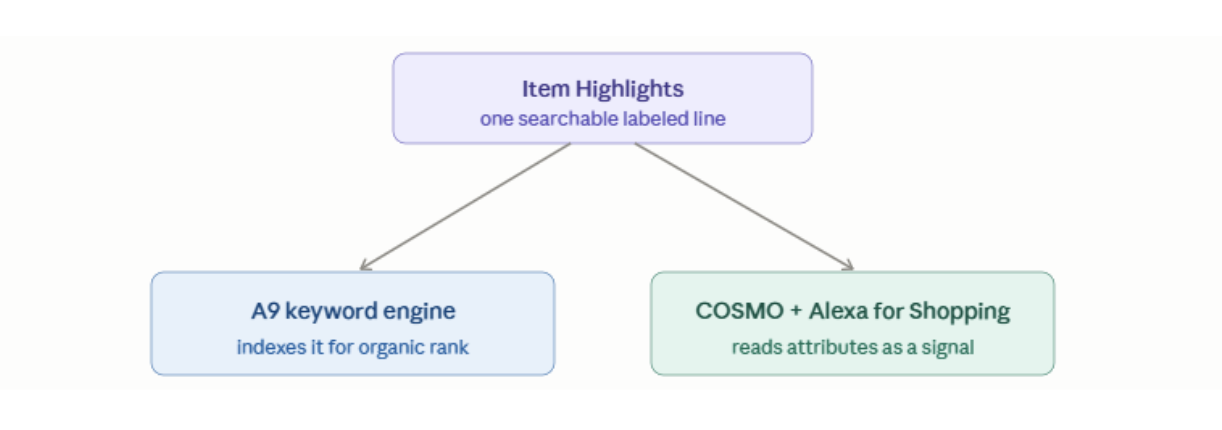
Why the format matters: Two engines read the same field
The layout of this field caters to two search mechanisms
A9 Keyword Engine: Amazon’s traditional organic ranking algorithm indexes the field directly
AI Discovery Graph (COSMO & Alexa for Shopping): COSMO connects products to buying contexts and user intent, while Alexa for Shopping references text directly to answer buyer questions
Each labeled phrase hands those systems a cleaner signal. Sensitive Formula makes who-it’s-for unambiguous; Enamel-Safe makes what-it-does unambiguous. A clean labeled line is legible to both engines. A stuffed or empty one is legible to neither.
Clean, labeled strings give these engines clear signals
Does Item Highlights actually help your ranking?
What Amazon confirmed, and what it hasn’t…
As of mid-2026, it is vital to separate verified facts from seller speculation
Confirmed: The field is indexed, searchable, capped at 125 characters, and active on mobile layouts as of June 2026
Reported but Unconfirmed: Rumors claim the Item Highlights line only displays publicly after a title drops below 75 characters
Unconfirmed: Amazon has released no official documentation regarding the exact algorithmic weight of Item Highlights compared to bullet points or backend terms
Because search weights remain unverified, avoid demoting your top organic rank-carrying terms out of the title
What the field looks like right now
The transition is actively rolling out
Listings utilizing the 75/125 split display the Item Highlights text below the title on mobile viewports, while desktop versions temporarily retain the traditional single-title configuration
Because mobile optimization drove this policy change, updating your fields now prepares your store for the majority of live traffic
Which keywords are safe to move?
The part DIY can’t answer…
Standard advice suggests moving “Tier-2 keywords,” but identifying load-bearing terms requires deep data analysis
While a manual approach using Brand Analytics and Search Term Reports works well for mid-tier listings, your top-performing products run the risk of ranking loss if key terms are shifted blindly
Automated niche-intelligence engines like Helix calculate keyword priority using search volume, competitor coverage, and rank-gap history to ensure structural changes don’t sacrifice your traffic
How to fill the field in Seller Central and the catches nobody warned you about
To update manually, go to Manage All Inventory, click Edit, open View enhancements, and utilize the Enhance Listings tool
API/Bulk Restrictions: Although SP-API bulk flat-file updates are now active, early rollouts triggered severe validation errors
Saving Errors: System glitches cause the field to occasionally reject text input, saving only when left blank
The Brand Registry Gap: Post-July 27, Brand Registered accounts receive a 14-day window to modify or reject Amazon’s automated AI title rewrites
Score it before and after, and know when to stop doing this by hand
Transitioning from a 162-character title to a balanced 75/125 split requires continuous measurement
Checking your listing with a free tool like the AI Readiness Score allows you to evaluate your indexation before and after making updates, ensuring your text satisfies search algorithms rather than just meeting character maximums
For large-scale catalogs, automated platforms scale these transformations efficiently, showing exactly how many net-new search terms your listings have picked up
FAQ’s
Are Item Highlights mandatory?
No, the field remains optional, and your product listings stay live if ignored
Does the 75-character cap apply to parent or child titles in a variation?
Amazon has not explicitly clarified parent-child title rules in writing
Can Amazon’s AI generate my Item Highlights for me?
Yes, the system provides automated drafts
Do Item Highlights replace my backend search terms?
No
Should I fill Item Highlights even if my title already fits 75 characters?
Yes
Is my category exempt from the 75-character title cap?
Only media categories (books, music, video) are exempt
To explore the complete, unedited strategies and technical insights for mastering this Amazon catalog update, read the full, detailed version of the article on ZonGuru – How To Optimize Your Amazon Item Highlights
As always, ask us anything. If we don’t know the answer, we’ll know someone who does!
Back to Blog
RECENT POSTS
- How to Manage Walmart, Shopify, eBay, and TikTok from Amazon Seller Central
- ChatGPT Traffic. Here’s the Catch.
- How to Use AI to Keep Walmart and Amazon Listings in Sync
- Countdown: Amazon Will Rewrite Your Titles If You Don’t
- Shopify Agentic Storefront – All You Need To Know
- Get In The Queue For Your Tariff Refunds!
- The Amazon Rufus Optimization Checklist
- Chat GPT Checkout 4%
- How to Sell Your Amazon Business Fast!
- TikTok Influence on Amazon
Archives
- September 2026
- August 2026
- July 2026
- June 2026
- April 2026
- March 2026
- February 2026
- January 2026
- December 2025
- October 2025
- September 2025
- May 2025
- May 2025
- April 2025
- March 2025
- February 2025
- January 2025
- January 2025
- October 2024
- September 2024
- September 2024
- August 2024
- August 2024
- July 2024
- June 2024
- May 2024
- April 2024
- March 2024
- January 2024
- December 2023
- November 2023
- October 2023
- September 2023
- August 2023
- July 2023
- April 2023
- April 2023
- March 2023
- February 2023
- December 2022
- November 2022
- October 2022
- September 2022
- June 2022
- May 2022
- April 2022
- March 2022
- January 2022
- November 2021
- October 2021
- September 2021
- August 2021
- June 2021
- May 2021
- April 2021
- March 2021
- February 2021
- January 2021
- December 2020
- November 2020
- September 2020
- July 2020
- June 2020
- April 2020
- March 2020
- February 2020
- January 2020
- December 2019
- November 2019
- October 2019
- September 2019
- August 2019
- July 2019
- June 2019
- May 2019
- April 2019
- March 2019
- February 2019
- January 2019
- November 2018
- October 2018
- September 2018
- August 2018
- July 2018
- March 2018
- February 2018
- January 2018
- October 2017
- September 2017
- August 2017
Subscribe to newsletter
